
In America From the Air, we limited our selves to the largest airports and the most popular air routes. Portland, Oregon is not among the airports we chose, so none of its flight routes are treated in the book. This is true of most of the airports in the US. With this and subsequent posts, I will remedy this shortcoming at least in part. Before looking at locations seen on specific routes, a few words on how to find a route for a flight you may take.
At one time, there was almost nothing showing commercial air routes outside of the professional aviation literature. Once on board your flight, you would find a magazine in the seat back pocket. A schematic map in the magazine showed the carrier’s routes in a very schematic fashion. Prior to the many labor disputes between flight crews and airline management, it was common for a member of the flight crew to describe the route early in the flight. Some pilots would identify various sites below the airplane while enroute. These customs disappeared for the most part during the 1990’s.
All was not lost, however, as long haul aircraft often had a route map channel on the inflight video service. If you flew overseas, you probably encountered this service. Sometimes these air planes were flown on domestic routes.
Today more and more domestic air planes have wifi, and typically the plane’s wifi home page includes a flight map showing the plane’s progress between airports. At this time, however, many planes are not yet equipped with wifi.
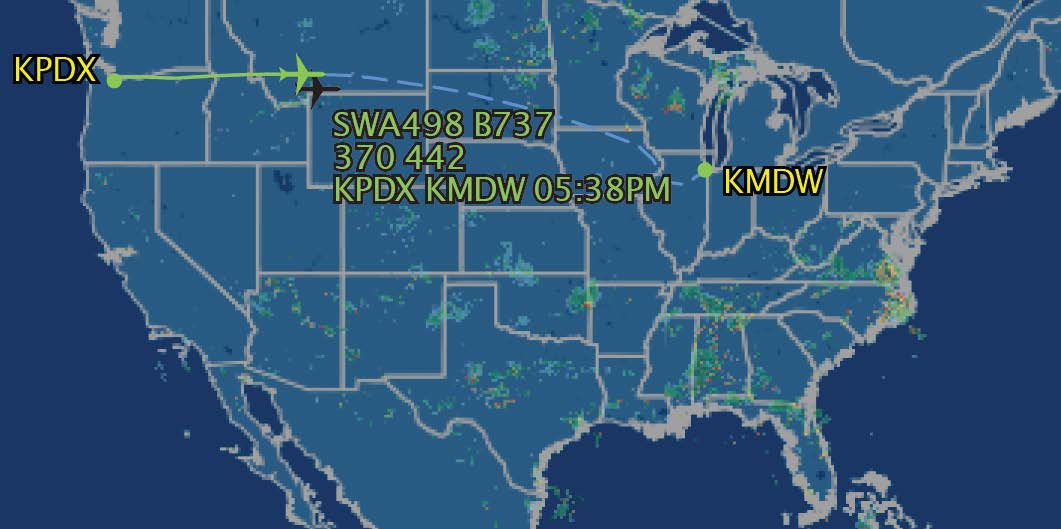
If you want to know where you are going before you fly, the internet hosts a number of flight tracking services. The image at the top of this post is from
On this website, you can enter either a flight number or a route in a search bar, and the site returns a list of flights. If a flight is in the air, you can click on that flight and a map appears showing its route up to that time as well as its planned route for the remainder of the flight. As the image shows, the flight from Portland to Chicago was just north of Yellowstone National Park when I captured the image.
The site allows you to zoom in, showing some detail of the landscape beneath the flight path, and it can also show the flight with the air traffic navigation map for the route.
Another site that shows specific flights, as well as all other commercial flights that are in the air is
If you are curious about current air traffic around a specific airport, both flightaware and flightradar have maps for commercial airports.
Other flight tracking sites include:
These have similar features to Flightaware, though with a different interface. In recent years, a number of airlines have also created flight tracking maps that can be accessed through the airlines’ flight status pages.
But what if you are on an airplane, do not have wifi, and want to know where you are? Ask the cabin crew! Ask the pilot when you enter the plane to describe route in some detail. Be persistent! Announcements from the flight crew describing the air plane’s route is a custom that should be revived!
 Seeing The Earth